Quarvilo
Cipher Archive
Cipher Archive
Couldn't load pickup availability
Share
1. Problem Statement
After studying arrays, learners often meet another JavaScript structure: the object. At first, objects may look readable because they use names and values, but they can become confusing when several properties appear inside one block. Learners may wonder how object properties differ from variables, how values are paired with names, and how an object can be passed into a function. Another challenge appears when arrays and objects are used together, creating examples with more than one layer of structure. Cipher Archive was created to help learners study objects with steady pacing, careful examples, and guided practice.
2. Solution
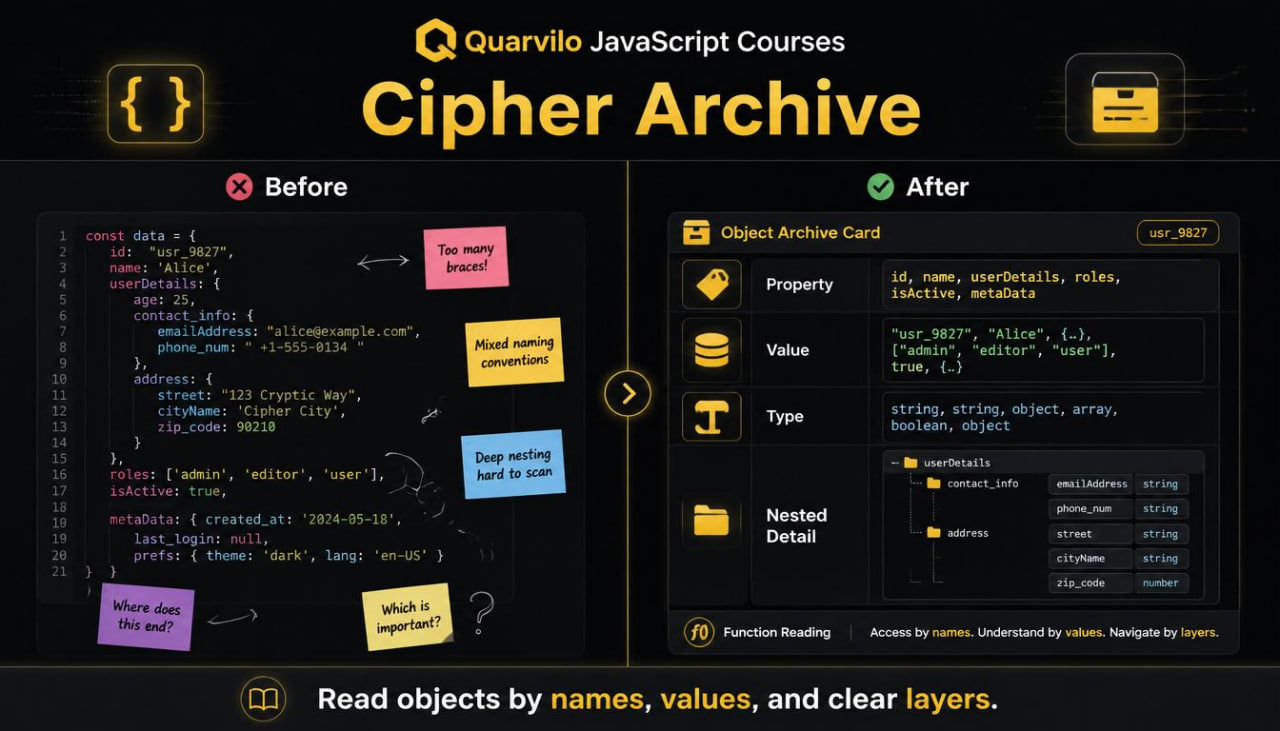
Cipher Archive explains objects as structured groups of related information written with property names and values. The course begins with the visual shape of an object, then explains property pairs, nested details, object reading patterns, and function-based object use. Each section connects the new material with earlier topics, including variables, arrays, conditions, and functions. Learners study how to identify property names, understand stored values, compare object shapes, and describe object behavior in plain language. The course gives learners a structured way to read object-based JavaScript examples without rushing into large data structures.
3. What’s Inside
Cipher Archive includes JavaScript course materials arranged around objects and structured data reading. The course begins with a review of arrays because arrays and objects are often compared in early JavaScript study. Learners revisit the idea of grouped values, then study how objects group details by name rather than by numbered position.
The first module introduces the object shape. Learners study curly braces, property names, colons, values, commas, and closing structure. The material explains how an object can describe one item, one record, one setting group, or one piece of information with several details. Examples include a learner profile, a course section summary, a task card, a simple item description, and a short status record. Each example includes reading notes that identify the object name, each property name, each value, and the full object boundary.
The second module focuses on property names. Learners study how a property name describes the kind of value stored beside it. The course compares vague property names with clearer names and shows how naming affects code reading. Examples include properties such as title, count, isOpen, levelName, sectionTotal, and reviewNote. The goal is to help learners see an object as a set of labeled details rather than a block of mixed information. Practice tasks ask learners to rename unclear properties and explain what each property represents.
The third module explains property values. Learners study how a property value may be text, a number, a true-or-false value, an empty value, an array, or another object. This section connects object study with earlier lessons about value types. Examples show how one object can hold different kinds of information while still following the same property-pair structure. Learners complete tasks where they identify the value type beside each property and explain why that value type fits the example.
The fourth module introduces property reading. Learners study how a value can be selected from an object by using the object name and the property name. The course shows this through short examples and reading tables. Each table separates the object name, the chosen property, the stored value, and the final result. This format helps learners trace the relationship between the object and the value being read.
The fifth module compares arrays and objects. Learners review how arrays use ordered positions, while objects use named properties. The course explains when a list-like structure may be easier to read as an array and when a detail-based structure may be clearer as an object. Examples compare a list of section names with an object describing one section. Practice prompts ask learners to decide whether a small example reads more naturally as a list or a named detail group.
The sixth module connects objects with functions. Learners study how a function can receive an object, read one or more properties, and return a short result. The material revisits parameters, arguments, and return values from the function tier. Examples include functions that read a title, count tasks, check a status, or format a short summary from object properties. Each function example includes guided notes that show how the object enters the function and how its properties are used inside the block.
The seventh module introduces object updates. Learners study how a property value can be changed, added, or reviewed inside a small example. The course explains what the object looks like before the update, what line changes the value, and how the object reads afterward. The goal is to make learners comfortable with tracking object changes in a written example. Practice tasks ask learners to compare before-and-after object states and describe the change in plain language.
The eighth module introduces nested structures. Learners study objects inside objects and arrays inside objects through compact examples. This section is careful and gradual because nested structures can become visually dense. The course explains how to read from the outside inward, identify each layer, and follow the path to one value. Examples include a course section with a nested details object, a learner note with a tags array, and a task card with status information. Learners complete reading tasks that ask them to mark each layer and describe where a value is located.
The ninth module focuses on object review habits. Learners receive worksheets for identifying object boundaries, property pairs, value types, nested layers, and function-based property reading. These worksheets support careful reading and repeated review. Learners are asked to explain each object in plain language, compare object shapes, and rewrite unclear examples with cleaner property names.
Cipher Archive also includes recap pages after each main section. These pages summarize object shape, property names, property values, arrays versus objects, function use, updates, and nested structures. The recap pages are arranged for repeat reading before practice tasks.
The glossary section expands with terms such as object, property, property name, property value, nested object, object shape, key-value pair, object update, detail group, and structured data. Each term is explained with a compact example and a short note.
The practice area includes object reading worksheets, naming exercises, value-type checks, nested-structure maps, function tracing prompts, and before-and-after update tasks. Learners study how related details are grouped, how values are selected, and how objects can move through small functions.
4. Who Is This For?
Cipher Archive is for learners who already understand variables, conditions, functions, and arrays, and now want to study JavaScript objects in an organized way. It fits learners who can read list-based examples but feel less certain when information is grouped by named properties.
This tier is also suitable for learners who want more practice with structured data. Objects appear often in JavaScript examples because they can describe related details in one place. Cipher Archive gives learners repeated reading practice so they can understand object shape, property names, value types, and nested layers.
The course may also be useful for learners who have seen objects before but want a more careful explanation of how they are written and read. It can work as a review tier before studying loops, collection methods, and wider code organization.
Cipher Archive is not centered on complex architecture or large technical systems. Its focus is object reading, property structure, small updates, nested examples, and practical written study tasks.
5. What You’ll Learn
- How JavaScript objects group related details
- How to read curly braces, property names, colons, and values
- How property names describe stored information
- How to identify text, number, true-or-false, array, and object values inside properties
- How to select a value from an object by property name
- How arrays and objects differ in structure
- How to decide whether information reads better as a list or a detail group
- How functions can receive objects and read their properties
- How to trace an object through a function example
- How property values can be changed or added in small examples
- How to read nested objects from the outside inward
- How to identify arrays inside objects
- How to compare object shapes
- How to explain object examples in plain language
6. 30-Day Refund Note
Cipher Archive is a paid Quarvilo course tier. After purchase, learners may review the course materials and contact Quarvilo within 30 days if the delivered materials do not match the course description. Refund requests are reviewed according to the store policy and the order details.
Do I need previous JavaScript knowledge before starting?
Do I need previous JavaScript knowledge before starting?
No previous JavaScript study is required for the opening tiers. The early sections begin with basic terms, code reading, values, variables, expressions, and small practice tasks.
Can I study at my own pace?
Can I study at my own pace?
Yes. The course materials are divided into sections, so learners can read, pause, review earlier pages, and return to tasks whenever they want.
What should I expect from higher tiers?
What should I expect from higher tiers?
Higher tiers include wider topic coverage, more examples, longer review sections, and deeper practice tasks. Each tier adds more structure and study material while staying focused on realistic JavaScript learning.
Self-paced learning overview
- 📁 Digital file available after purchase
- 🗂️ Long-term material availability
- 🔐 Secure checkout
- 🧩 Content updated in 2026